
Ortur F20 Laser Engraver & Cutter 3W/5W/1.3W
The Ortur Laser Master F20 is an entry-level desktop diode laser engraver and cutter sold in roughly 1.3W, 3W, and 5W optical output variants, aimed at hobbyists and beginners. It engraves wood, leather, acrylic, cardboard, and anodized or coated metals, and can cut thin materials such as 3mm basswood and cardstock on higher-power versions. It uses a fixed-focus laser module on an open-frame gantry and works with common free G-code software such as LaserGRBL and LightBurn.
View on Amazon #adAffiliate link — we may earn a commission.
Pros & cons
What we like
- Low entry price that suits first-time laser buyers and tight budgets
- Fixed-focus laser module removes the need for manual focusing, so setup is easier
- Works with popular software including LaserGRBL (free) and LightBurn (paid license)
- Compact, lightweight frame fits on a desk and can be moved easily
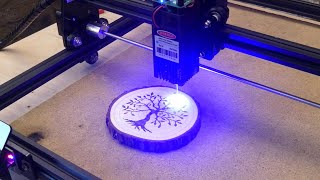
- Capable of clean, detailed engraving on wood, leather, and coated materials at its power level
What could be better
- Low optical output limits cutting to thin, light materials, and cuts are slow even with multiple passes
- Open-frame design with no enclosure means eye-safety goggles and ventilation are essential
- Small work area and light construction can introduce vibration or skewing at higher speeds
- Limited documentation and support, plus variation in quality control, can frustrate beginners
Key features
Who is this for?
Best for
Beginners and hobbyists who want a low-cost way to learn laser engraving and make small personalized items on wood, leather, and cardboard. Makers who primarily engrave rather than cut will get the most value.
Not ideal for
Anyone who needs fast or thick material cutting, production-level throughput, or an enclosed, safety-rated machine for a shared space or classroom. Users who want a large work area or app-based control should look elsewhere.
How it scores
Specifications
| Power | 1.3W / 3W / 5W optical output (variant dependent) |
|---|---|
| Work Area | Approximately 160 x 200 mm (varies by configuration; verify before purchase) |
| Software | LaserGRBL (free), LightBurn (paid); GRBL-compatible |
| Connectivity | USB (computer connection) |
| Laser Type | Diode laser module, 445nm blue (approximate) |
| Speed | Up to roughly 5000-10000 mm/min depending on settings (verify) |
| Weight | Approximately 2-3 kg (verify) |
| Focus | Fixed focus |
| Enclosure | None (open frame) |
| Material Compatibility | Wood, leather, cardboard, paper, acrylic (opaque/dark), anodized aluminum, coated metals, some plastics; thin cuts only |
Compatibility
Control is through desktop software over USB. LaserGRBL is Windows-only, while LightBurn supports Windows, macOS, and Linux. There is no official mobile app.